
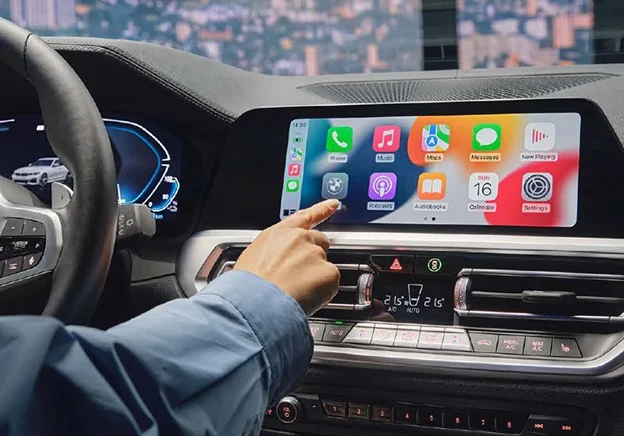
Apple CarPlay & Android Auto: What to Know Before You Buy
Whether you're a first-time car buyer or
upgrading to something more family-friendly, understanding Apple CarPlay and
Android Auto can help you choose a car that fits your digital lifestyle. This
guide breaks down what these systems do, how they differ, and which cars offer
them in 2026, without the fluff.
Remember when “tech features” in cars
meant a CD player and maybe Bluetooth? Fast-forward to today, and most car
shoppers under 40 want their smartphone to be the center of their driving
universe. That’s where Apple CarPlay and Android Auto come in.
These systems let you use maps, music,
messages, and more, right from your car’s touchscreen, like an extension of
your phone. But which system is better? How do they work? And do you really
need them?
Let’s decode it all.
What Are Apple CarPlay and Android Auto?
Think of Them As Your Phone… On Wheels
Apple
CarPlay (for iPhone users) and Android Auto
(for Android phones) are software platforms that project your
phone’s interface onto your car’s infotainment screen. Instead of learning your
car’s native software, you can use apps you already know.
●
Turn-by-turn directions from
Google Maps, Waze, or Apple Maps
●
Spotify, Apple Music, Audible,
Podcasts, all voice-controllable
●
Read and send texts with Siri or
Google Assistant
●
Calls, calendars, and even smart
home access
And the kicker? All with minimal
distractions. These platforms are designed with driving safety in mind.
Wired vs. Wireless: A Real-Life Difference
There are two ways Apple CarPlay and
Android Auto:
Wired
Plug your phone into a USB port
Wireless
Your phone connects via Wi-Fi and Bluetooth (no cables)
Why It Matters
Wireless versions feel more “built-in”
and eliminate clutter, but not all cars (especially budget trims) support it.
Before you buy, check if your future
vehicle offers wireless Apple CarPlay or Android Auto, especially if you hate
cords or use wireless charging pads.
Do You Need It? Here’s Who Benefits Most
Not every driver cares about smartphone
mirroring, but for many, it’s a non-negotiable. Here’s who should
prioritize it:
|
If
You… |
Why
It Helps |
|
Commute or take road trips |
Real-time traffic via Google Maps or Waze |
|
Have young kids |
Hands-free texting and calls during chaos |
|
Live in the city |
Parking spot drop pins, ride-share pick-ups |
|
Listen to music/podcasts daily |
Voice-control playlists without distractions |
|
Share cars |
Your apps appear when you connect your own
phone |
On the other hand, if you primarily use
your car for short errands and don't care about music or maps, the native
infotainment system might suffice.
Key Features to Know (and Compare)
Not all versions of Apple CarPlay and
Android Auto are created equal. Here's what to look for:
|
Feature |
Apple
CarPlay |
Android
Auto |
|
Voice Assistant |
Siri |
Google Assistant |
|
Map Apps |
Apple Maps, Google Maps, Waze |
Google Maps, Waze |
|
Messaging |
iMessage, WhatsApp |
SMS, WhatsApp, Telegram |
|
Wireless Support |
Widespread since 2019 |
Limited to newer models or phones |
|
App Support |
~20+ categories |
~30+ categories (more flexibility) |
|
Split-Screen |
Yes (iOS 13+) |
Yes (newer updates) |
|
Custom Dashboard |
iOS 13+ |
Android Auto 2023 update+ |
Specs Sources
ChromeData/J.D. Power, Apple, Google
Heads Up
Your car also needs the matching
hardware. Don’t assume older models will get updated, even with a new
phone.
2026 Car Models: Compatibility Cheat Sheet
Here’s a snapshot of what you’ll likely
find in 2026's new cars:
|
Brand |
Apple
CarPlay |
Android
Auto |
|
Toyota |
Standard on most trims |
Standard on most trims |
|
Honda |
Standard on all new models |
Standard on all new models |
|
Hyundai/Kia |
Wireless on mid/high trims |
Wireless on mid/high trims |
|
Ford |
Sync 4 systems = wireless |
Sync 4 systems = wireless |
|
Tesla |
Not available |
Not available |
|
BMW |
Optional/standard depending on trim |
Wireless since 2021 |
|
Subaru |
Standard on all 2026 models |
Standard on all 2026 models |
Tesla is the one major exception; it uses
its own proprietary system and doesn’t support Apple CarPlay or Android Auto.
Honest Pros and Cons of Each System
Apple CarPlay
Pros
●
Clean interface
●
Easy to use (if you’re already an
iPhone user)
●
Great Siri voice commands
Cons
●
Limited customization
●
Apple Maps isn’t for everyone
●
May have a glitch in older
vehicles
Android Auto
Pros
●
Flexible app compatibility
●
Great with Google Maps + Assistant
●
Higher customization
Cons
●
Depends heavily on your phone’s
power
●
Some interfaces look “busy.”
●
Inconsistent wireless support
FAQs Before You Choose Your Car
Can I add Apple CarPlay/Android Auto to an older car?
Yes, many aftermarket head units (like
Pioneer or Alpine) support both platforms. But that’s a project. For seamless
use, look for cars that include it from the factory.
What phones are compatible?
●
iPhone 6 and up (iOS 13+
recommended) for Apple CarPlay
●
Android 10 and up for most
wireless Android Auto setups
Do these systems use your mobile data?
Yes, but only for map routing, streaming
music, or messaging. No data is used if you’re not actively using those
features.
Is there a monthly fee?
Nope. As long as your car supports it and
your phone is compatible, it’s free to use.
Bonus Feature to Look For: 360 Cameras + Apple
CarPlay/Android Auto
If you’re all about safety tech and
smartphone ease, look for models that pair Apple CarPlay/Android Auto with a
360-degree surround view camera.
Why? Because parking becomes a breeze
when your playlist, maps, and overhead camera view all run through the same
central screen.
Lifestyle Use Cases: Who Should Prioritize Apple
CarPlay/Android Auto?
Dog Owners
Drop a pin on your favorite trailhead via
Google Maps
New Parents
Voice-to-text your partner while
wrestling car seats
Frequent Travelers
Download offline maps before driving in
rural areas
EV Drivers
Locate public chargers with real-time
availability
Suburban Commuters
Use Spotify and Waze together in
split-screen mode
Decision Summary
If you’re shopping for a new car in 2026,
Apple CarPlay and Android Auto aren’t just “nice to have”; they’re key to
making your vehicle feel like an extension of your daily life. Whether it’s
navigating school drop-off lines, curating your morning commute playlist, or
staying connected without distraction, these features bring tech convenience
into the car without the learning curve.
But not all implementations are equal.
Wireless vs wired, screen size, trim level, those details matter. So, before
you fall for a flashy touchscreen or a sleek exterior, check that the car fits
your tech lifestyle, too.
Start Smart: Begin Your Search with CarCompass
Looking for family-friendly SUVs with
wireless Apple CarPlay? Or small city cars with Android Auto and a simple UI?
Start your search with lifestyle filters at CarCompass.com. More intelligent search starts
here. Navigate with confidence.